
Record a cupping in Factory and score the roast
A roast curve tells you what you did. A cupping tells you whether it worked. Factory attaches a scored cupping to its batch, so the best-tasting roast of a coffee is recorded alongside its curve.
6 min read Updated October 19, 2026
Cuppings in Factory are tied to roasts, not standalone notes. Each one records the batch it scored, the coffee, the cupper and the date, includes the ten SCA attributes with taints and faults, and produces a total score. With the cupping beside the roast data, you can compare three batches of the same coffee, see which curve tasted best, and save that one as the profile.
Add a cupping
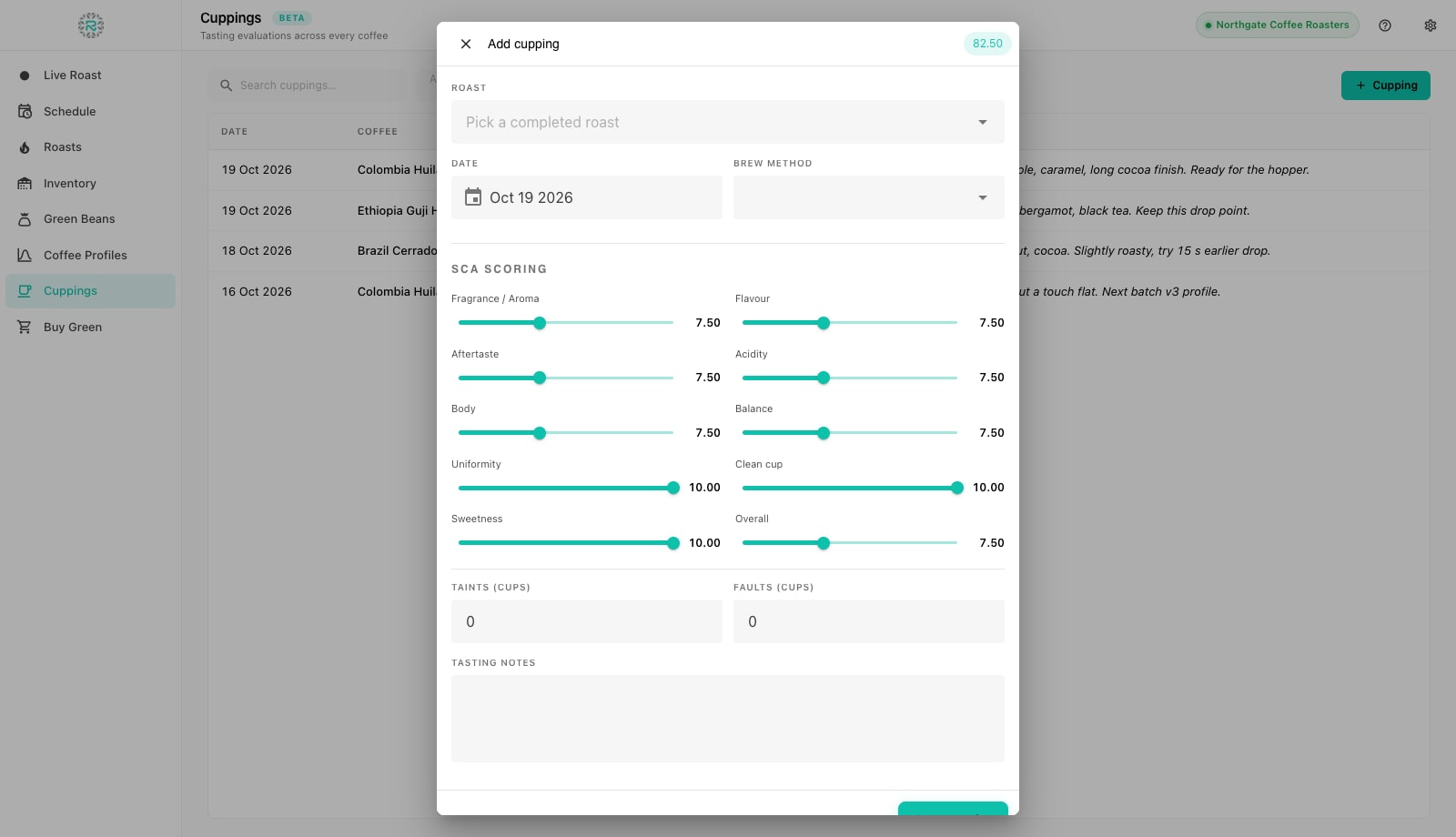
- Open Cuppings in the left rail and press Cupping. (From a roast, press Add Cupping in the roast detail or on the completed row in the Schedule; the roast is then pre-selected.)
- In the Add cupping dialog pick the Roast from the completed batches. Factory shows the batch, date, operator and machine under the picker so you cup the right one.
- Set the Date (defaults to today) and the Brew method: Cupping bowl, V60, Aeropress, Espresso or French press. Scoring a coffee as espresso and as filter are two cuppings, not one.
- Score the SCA attributes on the sliders, in quarter points from 6 to 10: Fragrance / Aroma, Flavor, Aftertaste, Acidity, Body, Balance, Uniformity, Clean cup, Sweetness and Overall. The running total in the corner updates as you go.
- Enter Taints (cups) and Faults (cups) if any cup on the table was defective. Factory deducts two points per tainted cup and four per faulted cup, the same arithmetic the web app uses, so Factory and Roastnet agree on the score.
- Write Tasting notes: the descriptors and the decision, such as peach, bergamot, black tea, keep this drop point. Press Save cupping.
Reading a cupping
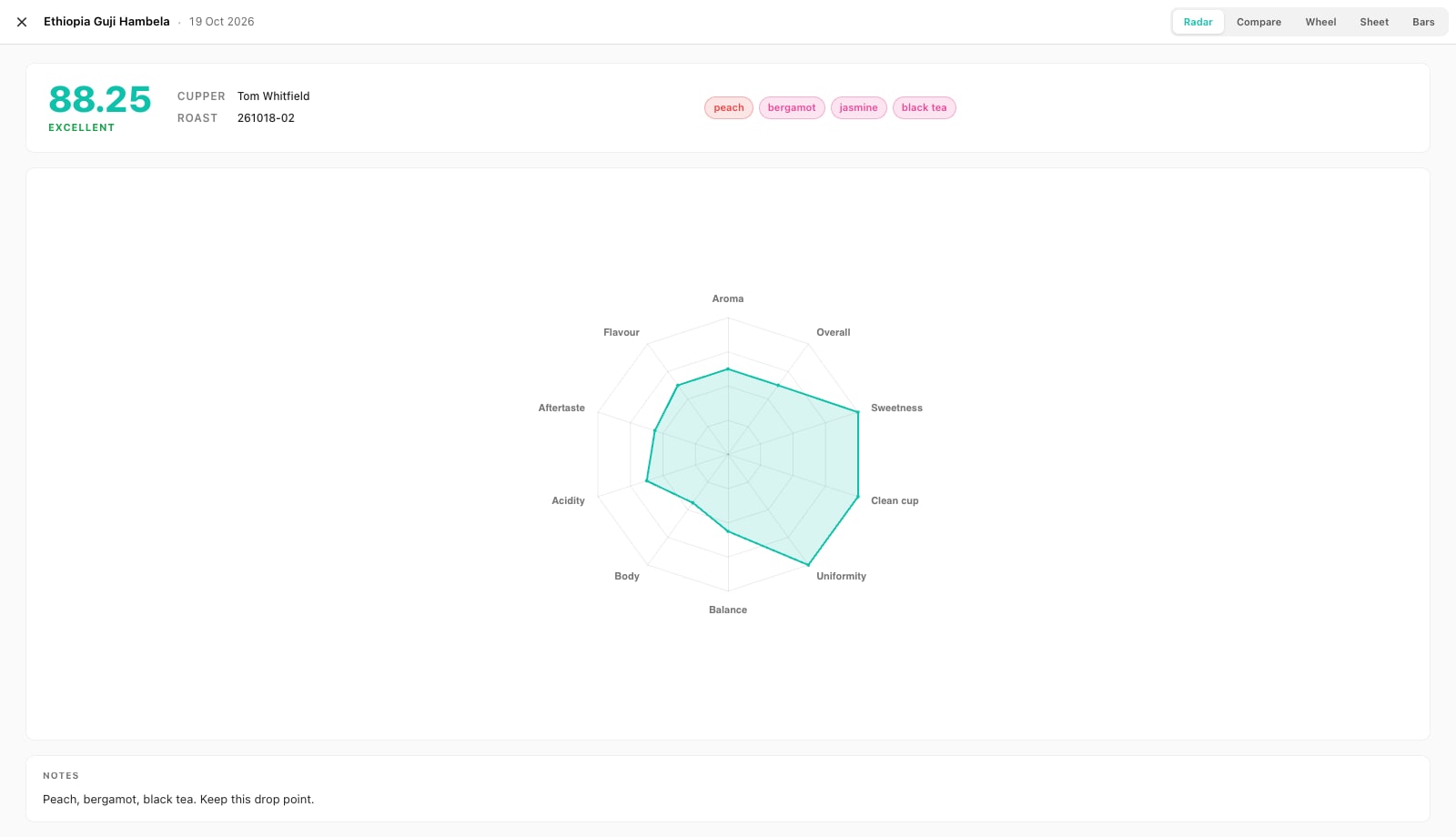
The Cuppings list shows Date, Coffee, Roast, Cupper, Score and the first line of Notes, with a search box and filters by coffee, cupper and date range (last 7, 30 or 90 days). Click a row to see the details. Scores fall into trade bands: Outstanding, Excellent, Very good, or Below specialty. The views along the top display the same numbers in different ways: Radar shows the attribute shape at a glance, Bars shows the attribute values, Wheel groups flavor descriptors by family (fruity, floral, sweet, nutty and cocoa, spice, roasted, green, fermented), and Sheet uses the classic scoresheet layout. Compare overlays other cuppings of the same coffee so you can see where one roast scored higher than another.
Making cuppings pay
- Cup every production coffee on a rhythm, for example the first batch of each new lot and one batch a week after that, so the record has enough points to show drift. The production cupping protocol sets out a practical routine.
- Name the cupper. Scores drift more between people than between batches. The Cupper column lets you compare a roaster's scores against their own.
- Write the decision, not just the flavors. The next roaster needs a decision: keep this drop point, or try 15 seconds earlier.
- Close the loop in Coffee Profiles. The profile list shows an Avg score column based on cuppings of roasts that used each profile. Revisit a profile if its average is falling.
Offline and sync
Cuppings save on the device first and sync to Roastnet when connected, appearing on the same batch in the web app. A cupping logged offline against a batch that has not yet synced keeps its link and resolves it once the batch reaches the cloud. The Pending sync pill in the top bar shows anything still queued.
Scored and on the record
- Roast picked before scoring, so the cupping is tied to a batch
- Brew method chosen; espresso and filter scored separately
- Taints and faults entered rather than folded into Overall
- Notes end with a decision for the next roast
- Avg score checked on the profile after a few cuppings
Where Roastnet helps
Questions roasters ask
- Can I cup a coffee that was not roasted in Factory?
- A cupping needs a completed roast to attach to. Roasts completed on the web or on another Factory install appear in the picker when you are connected, so you can score those too.
- How is the total score calculated?
- The ten attribute scores are added, then two points are deducted per tainted cup and four per faulted cup. Factory and the Roastnet web app use the same formula.
- Can I compare cuppings of different coffees?
- The Compare view overlays cuppings of the same coffee to guide roast changes. To compare different coffees, sort the Cuppings list by score or filter by date.
- Who can see my cupping notes?
- Once cuppings sync, everyone in the roastery workspace can see them on the batch in Roastnet and in any connected Factory install. Offline cuppings stay on the device until you reconnect.
Read next
A cupping protocol for production, not competitions
Production cupping answers one question: is this batch the same as the reference? A simpler, faster method than full scoring, with the controls that keep it honest.
Review roast history and compare curves in Factory
Roasts is the archive of every finished batch, with its recorded curve, events and weights. Open a roast to replay it, compare it with the profile and the last few batches on the same machine, and decide what to change next time.
Building a QC program for a roastery
Quality control is a set of small, regular checks with clear rules for what happens when one fails. A program a small roastery can run every week.
Run the roastery from one place
Green stock, roast plans, wholesale orders and the green coffee market in one platform, with a free roast-logging app for your machine.