
Buy green coffee from Factory, and list spare lots for sale
Buy Green puts the live green coffee market on the screen next to the roaster. Browse listings from importers and other roasters, order a lot, and it arrives in your inventory and catalog without double entry. The same screen lets you sell coffee you will not roast.
6 min read Updated October 19, 2026
The green coffee market is a Roastnet feature, so the Buy Green screen requires Factory to be connected to a workspace. Browsing is free. Ordering sends an order to the seller through Roastnet, which handles the paperwork, payment and delivery. In Factory, you can browse lots, order what you need, and find it in Inventory and Green Beans once it is received.
Browse the market
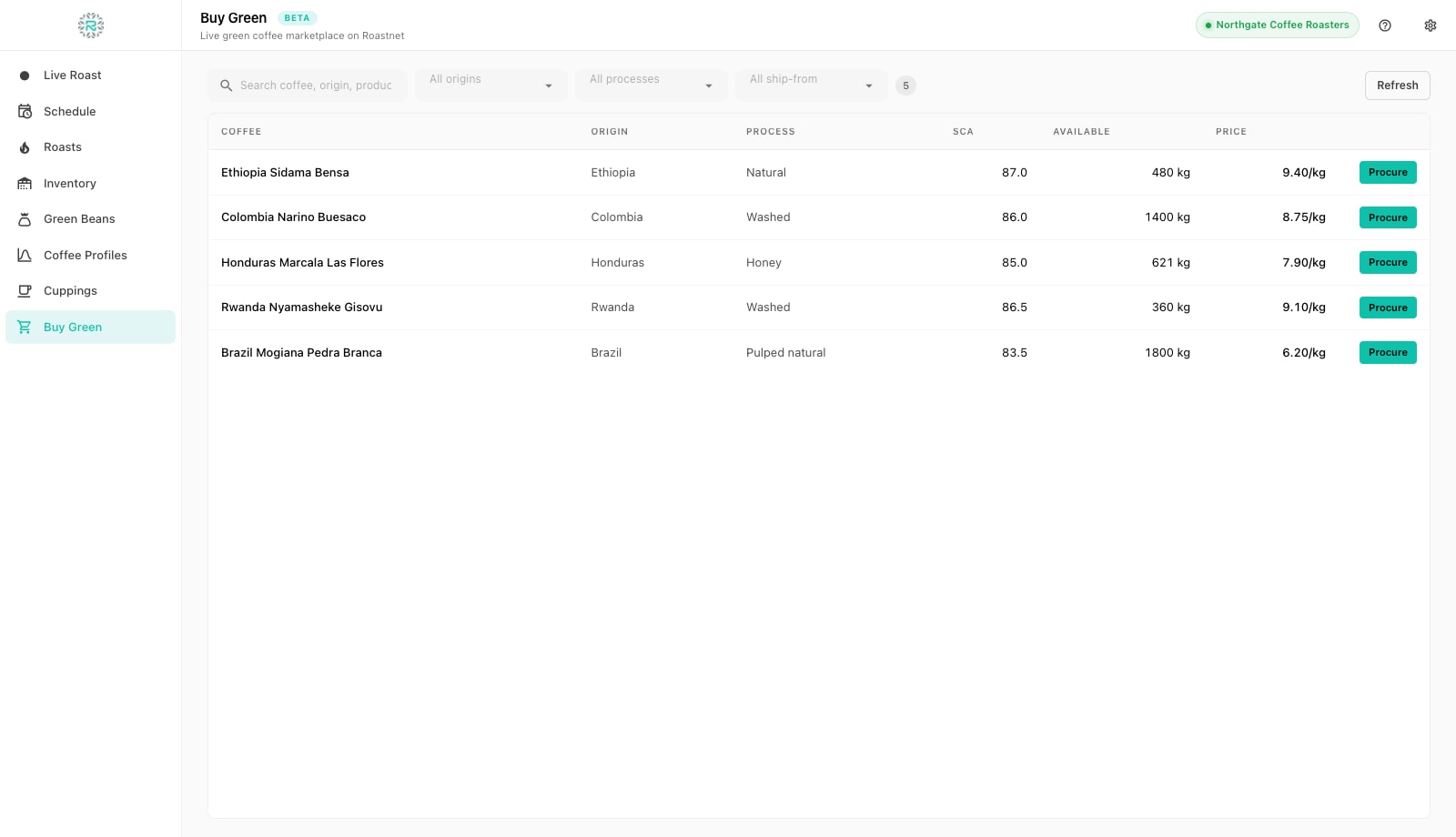
Open Buy Green in the left rail. Each listing shows the Coffee, Origin, Process, the seller's SCA score, the kilograms Available and the Price per kilogram. Search by coffee, origin or producer, and filter by origin, process and ship-from country. The badge beside the filters counts the matches. Refresh loads the latest listings, and the screen also updates when the market broadcasts a change. If the screen asks you to connect, pair Factory with Roastnet first. Offline, it shows a note instead of listings.
Procure a lot
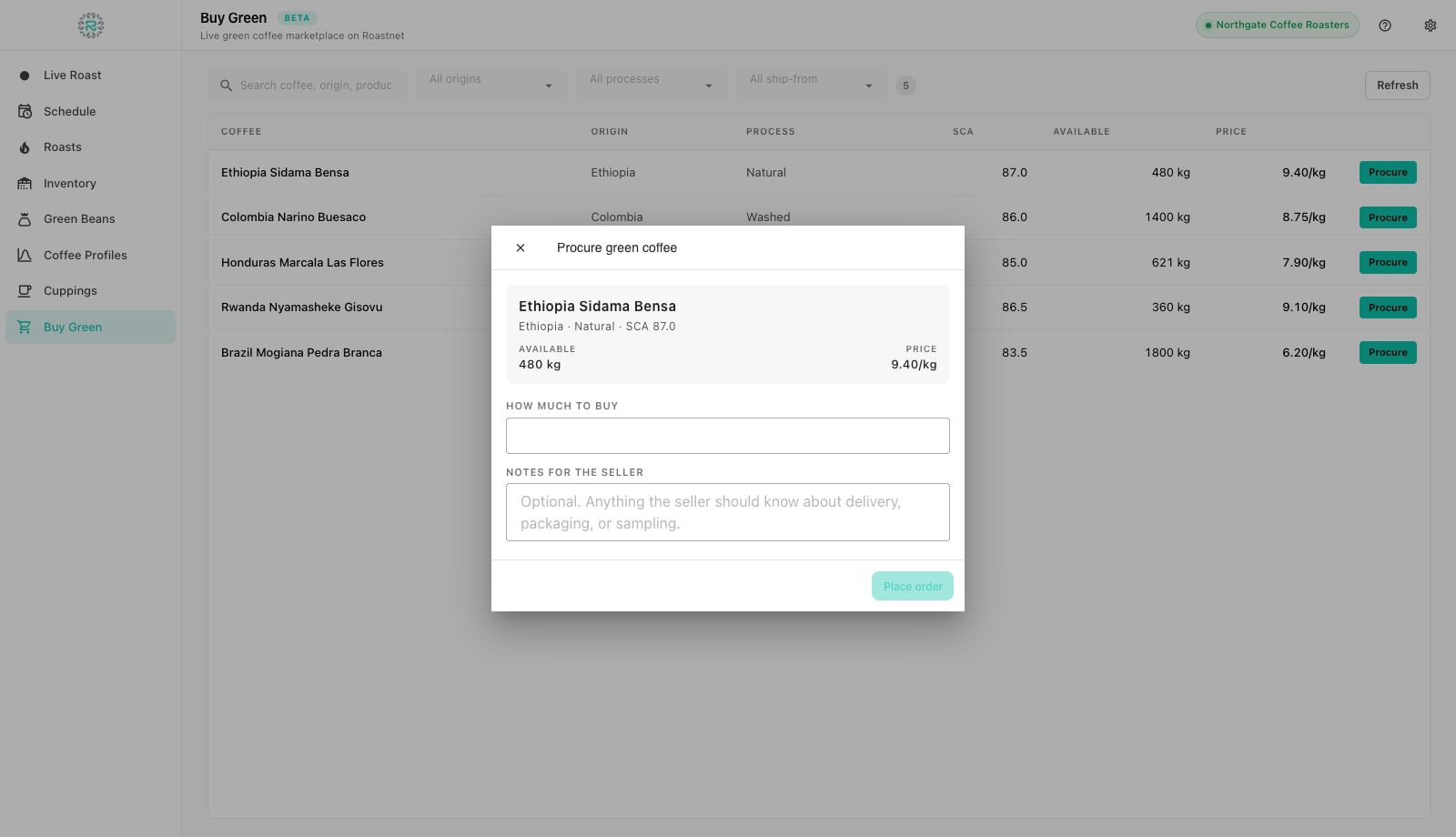
- Press Procure on the listing. The Procure green coffee dialog opens with the lot's available weight and price.
- Enter How much to buy in kilograms. Factory refuses more than the lot has and shows the Estimated total as you type.
- Add Notes for the seller if there is anything they should know about delivery, packaging or sampling.
- Press Place order. The order goes to the seller through Roastnet and Factory confirms it was sent; the seller confirms shipping from their side, and the order's progress, invoice and delivery are handled in the Roastnet web app.
- When the coffee is received in Roastnet, it appears in Factory as a lot in Inventory and as a bean in Green Beans, ready to schedule. There is nothing to re-key.
Sell a lot you will not roast
- Open Inventory and press Sell on the lot. The List on marketplace dialog opens showing the lot and what is on hand.
- Enter the Weight to list (up to the on-hand figure), the Price per kg, and optionally an Available from date: leave it blank for a spot listing available now, or set a future date for a forward listing.
- Add Notes for buyers: cupping notes, packaging, shipping options.
- Press List for sale. The listing goes live on the Roastnet market and buyers see it immediately. The listed weight moves out of your on-hand figure.
- Track it under Listed on marketplace at the top of Inventory, which shows each live listing with the weight available, price, ships-from date and how much has sold. Withdraw takes a listing down and returns the weight to on-hand.
You cannot list a lot received offline until it reaches Roastnet. The dialog explains this and points to the pending-sync pill. Once the pill clears, return and list the lot.
What happens in Roastnet
Orders placed from Factory are standard market orders. Where Roastnet resells coffee between roasters and delivers it, the buyer pays and the seller receives payment through Roastnet. Where an importer sells directly, the importer invoices the roaster and Roastnet charges nothing. The sourcing page explains the market by country, and the green coffee buying guide covers samples, contracts and landed cost.
Trading from the roast room
- Factory connected to the workspace before opening Buy Green
- Lot procured with a note on delivery or sampling where it matters
- Received coffee checked in Inventory and Green Beans, not re-entered
- Spare lots listed with an honest cupping note and a ships-from date
- Listings withdrawn when plans change
Where Roastnet helps
Questions roasters ask
- Do I need a Roastnet account to buy green from Factory?
- Yes. Once Factory is connected, you can browse listings and send orders through your workspace. Offline, the screen asks you to reconnect.
- Does the procured coffee appear in my inventory automatically?
- Yes. When the order is received in Roastnet, the lot and its bean record sync to Factory, ready to schedule without entering the details again.
- Can I sell roasted coffee from Factory?
- No. The Sell button lists green lots on the green coffee market. Roasted coffee is sold to cafes and customers through the Roastnet sales, storefront and portal features.
- What does Available from mean on a listing?
- Blank means spot, available now. A future date means the coffee ships from that date, which is how afloat or forward lots are listed.
Read next
Add green coffee to Factory: the bean catalog and receiving stock
Factory keeps two lists that beginners often confuse: Green Beans is the catalog of coffees you buy; Inventory is the bags you actually hold. Add the coffee first, then receive the bags against it, so every roast deducts from the right lot.
How to buy green coffee for a roastery
From the first sample request to the sacks on your floor: where green coffee comes from, how much to buy, how prices are set, and the checks that stop you paying for a disappointing lot.
Buying through an importer or direct from origin
Direct trade is a relationship with real costs: you take on finance, logistics, customs and quality risk that an importer would otherwise carry. How to decide which coffees to buy which way.
Run the roastery from one place
Green stock, roast plans, wholesale orders and the green coffee market in one platform, with a free roast-logging app for your machine.